What Should You Look for in Key Management System Vendors?
Key management system vendors provide the hardware, software and services required to secure, distribute, monitor and document the use of physical keys. When comparing vendors, organizations should evaluate how each key is physically protected, how users are authenticated, how permissions are assigned, what information appears in the audit trail, whether overdue keys trigger alerts, how the system integrates with existing infrastructure and whether it can expand as operational needs grow. The right provider should deliver more than a locked cabinet. It should provide a complete, reliable and scalable framework for controlling physical access across the organization.
Understanding the Role of Key Management System Vendors
Physical keys still provide access to some of the most valuable and sensitive resources within an organization. They open vehicles, buildings, storage areas, equipment rooms, maintenance facilities, server rooms, warehouses, offices and restricted operational zones. When those keys are managed through a drawer, basic cabinet, paper sign-out sheet or spreadsheet, the organization often has limited control over who can access them and little reliable information when something goes wrong.
Professional key management system vendors address this problem by combining secure physical storage with electronic authentication, configurable permissions and automated documentation. Instead of asking employees to record key transactions manually, the system identifies the user, confirms whether that person is authorized to access a specific key and records the transaction automatically.
This article focuses on vendors that manage physical keys. The term “key management system” is also used in cybersecurity to describe the management of cryptographic and encryption keys. Although both categories involve access control, they are entirely different technologies. Organizations searching for physical key management system vendors should look specifically for electronic key cabinets, physical key control systems, automated key tracking solutions or secure key storage systems.
The purpose of a professional system is not simply to organize keys. It is to create a controlled process in which every key has a defined location, every user has a defined level of access and every transaction can be reviewed when necessary.

Key Cabinet Suppliers vs. Key Management System Vendors
A traditional key cabinet supplier generally provides a physical enclosure in which keys can be hung or stored. The cabinet may use a mechanical lock, combination lock or basic electronic code. This can prevent casual access, but it does not necessarily control access to each key inside the cabinet.
A professional key management system vendor provides a broader operational solution. The cabinet is connected to software that identifies users, controls permissions and records activity. Depending on the system architecture, the solution may also issue alerts, generate reports, manage several cabinets and exchange information with other organizational platforms.
This distinction matters because locking the outer cabinet does not automatically provide complete key control. Once a conventional cabinet is opened, the authorized user may be able to see or reach keys that were not assigned to them. An organization must therefore evaluate not only whether the cabinet is protected, but also how each key is secured after the user has been authenticated.
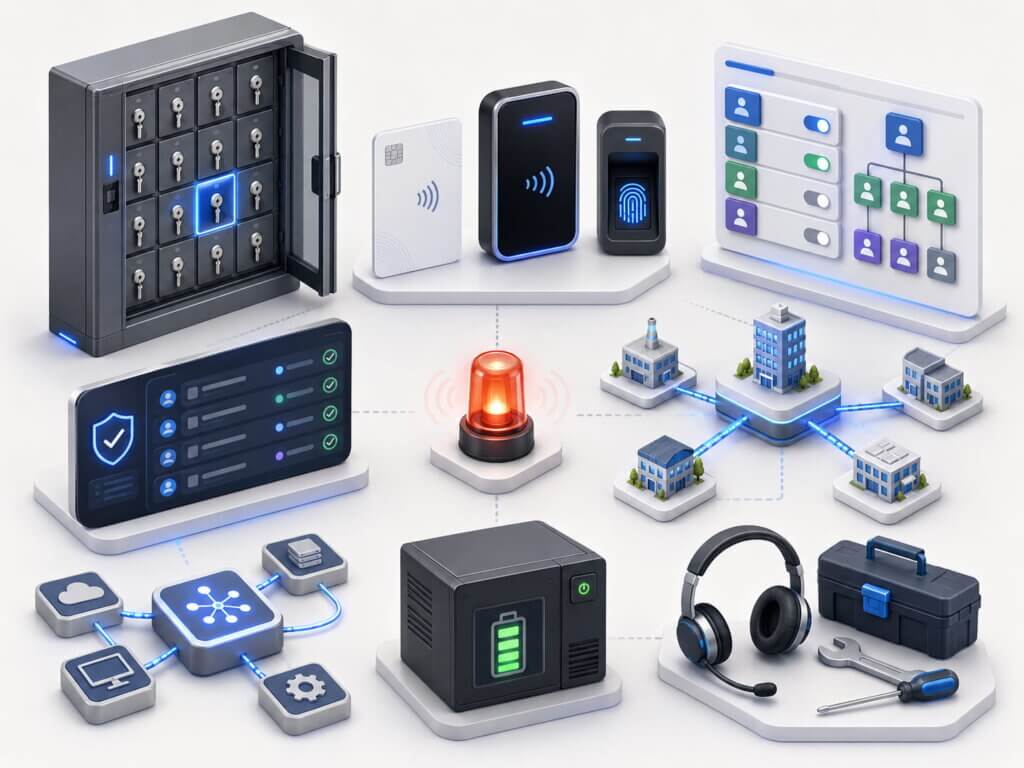
A complete key management solution may include:
-
Electronic cabinets or individually secured key compartments
-
PIN, card, RFID or biometric authentication
-
User-specific and role-based permissions
-
Automated removal and return records
-
Overdue key rules and alerts
-
Management dashboards and reporting tools
-
Integration with access control, HR or fleet platforms
-
Installation, configuration, training and technical support
Electronic systems from established vendors typically combine controlled physical storage with audit trails and digital access rules. For example, Traka describes electronic key management as a combination of monitoring, audit trails and controls, while Morse Watchmans emphasizes modular systems, reporting and interoperability with access control platforms.
Different Types of Key Management System Vendors
Not all key management system vendors serve the same operational needs. Some specialize in small standalone units, while others provide large enterprise systems capable of managing multiple locations, complex permissions and extensive key inventories.
Standalone Key Management Systems
A standalone system operates as an independent unit and may not require a permanent network connection or central server. These systems can be suitable for smaller organizations, individual departments, remote facilities or locations where only a limited number of keys must be controlled.
The main advantage is relative simplicity. Installation may be faster, and the organization can gain better accountability without implementing a large enterprise platform. However, buyers should verify how data is backed up, how reports are retrieved and whether the system can later be connected to other units.
On-Premise Key Management Systems
An on-premise system stores and manages operational data within the organization’s own environment. The software may be installed on a local workstation or server, allowing the organization to retain direct control over user information, transaction records and system configuration.
This approach may be preferred by government bodies, critical infrastructure sites, security-sensitive facilities and organizations with strict internal data policies. It can also provide operational independence when internet access is restricted or unreliable.
When comparing on-premise key management system vendors, organizations should examine server requirements, backup processes, cybersecurity responsibilities, software updates and the availability of offline functionality.
Cloud-Based Key Management Systems
Cloud-based platforms allow administrators to manage systems and view information through an online interface. This can simplify centralized oversight, particularly for organizations operating several sites.
A cloud system may offer convenient remote management, automatic software updates and easier multi-location visibility. However, the buyer should understand where information is hosted, how access is secured, what happens during an internet outage and whether the service requires a continuing subscription.
Hybrid Systems
Hybrid solutions combine local cabinet operation with centralized or remote management capabilities. The cabinet may continue to authorize users and record transactions locally while synchronizing selected information with a central platform.
This architecture can provide a useful balance between operational continuity and organization-wide visibility. The exact functionality, however, varies considerably between vendors.
Enterprise and Multi-Site Systems
Enterprise key management system vendors are designed for organizations that need to manage hundreds or thousands of keys across departments, buildings, branches or geographical locations.
These systems should support centralized administration without removing local operational control. For example, a corporate security manager may define global policies while local administrators manage day-to-day access for their own teams.
A scalable enterprise solution should allow the organization to add cabinets, users, keys and sites without rebuilding the entire system.

How to Compare Key Management System Vendors
Choosing a provider based only on cabinet size or initial price can result in a system that does not meet the organization’s actual security and operational requirements. A structured comparison should examine the complete lifecycle of each key, from storage and authorization to removal, return, reporting and incident investigation.
1. Examine How Each Key Is Physically Secured
The first question should be simple: what can a user physically access after logging into the system?
Some electronic cabinets release a specific electronic key tag while other keys remain attached to locked positions. Other solutions store keys inside separate locked compartments. There are also systems in which opening the main cabinet door exposes a wider section of the key inventory.
These architectures do not provide the same level of protection. An individually secured key reduces the opportunity to remove, handle or interfere with other keys. This can be especially important when the cabinet contains master keys, vehicle keys, restricted-area keys or keys associated with high-value assets.
Organizations should ask vendors to demonstrate the complete retrieval process rather than relying on general statements about cabinet security. The demonstration should show exactly what the user sees, what the user can touch and which physical barriers remain locked.
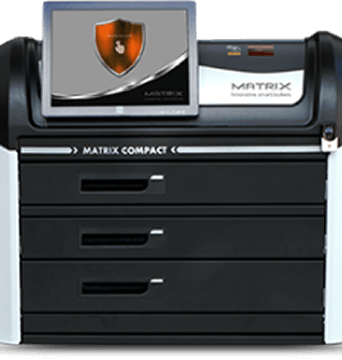
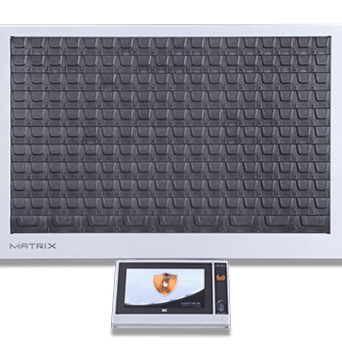
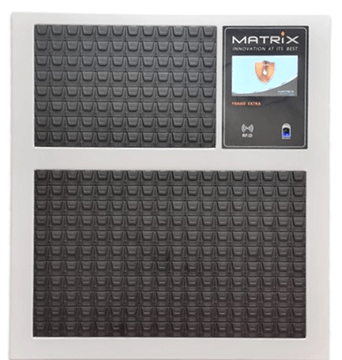
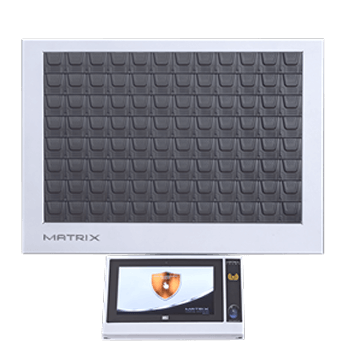
Matrix Key Control uses an architecture in which each key can be stored in its own electronically locked compartment. This means authorization can be limited to the specific compartment assigned to the user instead of exposing a shared cabinet interior.
2. Review User Authentication Options
Authentication determines how the system confirms the identity of the person requesting a key. The available method should match the organization’s risk level, workforce and existing credential infrastructure.
Common options include:
-
Individual PIN codes
-
Proximity or RFID cards
-
Existing employee badges
-
Magnetic cards
-
Fingerprint readers
-
Other biometric identification methods
-
A combination of two authentication factors
A basic PIN may be sufficient for a small internal office, but a sensitive facility may require an employee card together with biometric verification. Organizations should also consider how credentials are issued, updated and revoked.
The system should make it easy to disable access when an employee leaves, changes roles, loses a card or no longer requires a particular key. Shared PIN codes should be avoided because they weaken accountability and make it difficult to associate a transaction with one specific person.
3. Evaluate the Depth of Permission Management
A modern system should provide more than an authorized or unauthorized setting. Access requirements often vary according to the key, employee, department, shift, location and time of day.
The vendor should allow administrators to define rules such as:
-
A user may retrieve only selected keys.
-
A department may access a defined group of keys.
-
A key may be available only during scheduled working hours.
-
A contractor’s authorization may expire automatically.
-
A sensitive key may require additional approval.
-
A user may be prevented from taking a second key before returning the first.
-
A key may have a maximum permitted checkout period.
Granular permissions allow the system to support real operational policies. A maintenance technician may require access to utility rooms during a scheduled shift, while a security manager may need broader access at all hours. Both users can operate through the same system without receiving the same privileges.
Role-based administration is particularly important for large organizations. It reduces the need to configure every user individually and helps maintain consistent policies when employees join, move between departments or leave the organization.
4. Inspect the Audit Trail
The audit trail is one of the most important differences between manual key storage and an electronic key management system. A reliable audit trail should document transactions automatically, without depending on employees to complete a paper form or update a spreadsheet.
For every transaction, the organization should be able to identify:
-
The user who accessed the system
-
The key that was removed or returned
-
The exact date and time
-
The cabinet or location involved
-
The status of the transaction
-
Failed or unauthorized access attempts
-
Relevant permission or configuration changes
The records should be searchable and easy to understand. Administrators should be able to review activity by key, user, department, date, cabinet or event type.
An effective audit trail supports more than incident investigation. It can help the organization identify recurring delays, underused assets, abnormal access patterns and weaknesses in its internal procedures. It can also provide evidence during compliance reviews, insurance inquiries or security audits.
Electronic systems from vendors such as deister automatically document key withdrawals and returns, while Morse Watchmans systems provide user and key tracking through management software.
5. Compare Reports, Dashboards and Alerts
Recording information is useful only if administrators can find and interpret it. The software should convert transaction data into practical operational information.
Useful reporting capabilities may include:
-
Keys currently outside the cabinet
-
Overdue keys
-
Activity by user or department
-
Frequently used and rarely used keys
-
Unauthorized access attempts
-
Transactions outside normal working hours
-
Cabinet status and system events
-
Scheduled daily, weekly or monthly reports
-
Export to common file formats
Alerts should be configurable rather than limited to one fixed rule. A vehicle key may become overdue after several hours, while a master key may require immediate escalation if it is not returned within a few minutes.
Organizations should ask how alerts are delivered. Depending on the vendor, notifications may appear in the management dashboard or be sent by email, text message or another integrated system.
A useful alert should clearly identify the key, responsible user, expected return time and action required. Vague notifications create additional work and can cause administrators to ignore future alerts.
6. Check Capacity and Scalability
The number of keys managed today should not be the only factor in system sizing. Organizations should consider planned growth, additional locations, new buildings, fleet expansion and future acquisitions.
A system that is suitable for 30 keys may become inefficient when the inventory reaches 80. Similarly, a single-site solution may not support centralized management when the organization opens additional branches.
Questions to ask include:
-
What is the minimum and maximum system capacity?
-
Can additional modules or cabinets be added?
-
Can different cabinet sizes operate under the same software?
-
Can multiple sites be managed from one interface?
-
Is there a practical limit on users or administrators?
-
Can the system manage cards, documents or other assets in addition to keys?
-
Does expansion require new licensing or server infrastructure?
Scalability should be demonstrated, not assumed. The vendor should explain how a small installation can develop into a larger environment and which components would need to be added or replaced.
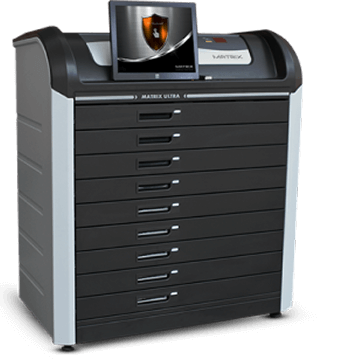
The Matrix product range includes systems for smaller inventories as well as high-capacity configurations. The MATRIX ULTRA, for example, is presented as supporting up to 1,782 keys in a cabinet system.
7. Understand Software Deployment and Data Ownership
The procurement team should know where the system’s data is stored, who can access it and what happens if the commercial relationship with the vendor ends.
Important questions include:
-
Is the software installed locally or hosted by the vendor?
-
Who owns the transaction records?
-
Can all historical data be exported?
-
Does the system require a continuing subscription?
-
What services stop if a subscription ends?
-
How are backups created and restored?
-
How are software updates distributed?
-
Which cybersecurity protections are included?
-
Can the cabinet continue operating without an external connection?
These questions affect long-term cost, operational independence and compliance. A lower initial hardware price may be offset by mandatory annual licenses, cloud fees, integration charges or support contracts.
Organizations with strict information security requirements may prefer an on-premise solution, while companies with distributed locations may value remote administration. The right choice depends on the operating environment rather than on a universal preference for cloud or local deployment.
8. Verify Integration Capabilities
A key management system should not necessarily operate as an isolated security product. Integration can reduce duplicate administration and ensure that key permissions reflect current employee or operational information.
Potential integrations include:
-
Physical access control systems
-
Human resources platforms
-
Active Directory or identity management
-
Fleet management software
-
Dealer management systems
-
Property management platforms
-
Visitor and contractor management
-
Security management software
-
Building management systems
-
Application programming interfaces
For example, an integration with HR may automatically remove key permissions when an employee leaves. An access control integration may allow the employee to use the same badge for building access and key retrieval. A fleet integration may associate a vehicle key with a reservation or authorized driver.
The buyer should ask whether an integration is already supported or would require custom development. The vendor should also explain which system is considered the authoritative source for user data and permissions.
Traka describes integration with access control and HR systems as a way to apply granular rules to physical key access, while Morse Watchmans offers systems designed for interoperability with access control platforms.
9. Test Reliability and Business Continuity
A key cabinet can become operationally critical. If it fails, employees may be unable to access vehicles, rooms or equipment required for normal work.
Before selecting among key management system vendors, organizations should understand what happens during:
-
A power failure
-
Loss of network connectivity
-
A software or server outage
-
Failure of the authentication reader
-
Damage to the touchscreen
-
Loss of an employee credential
-
A cabinet communication error
-
An emergency requiring immediate access
The system should have clearly defined recovery and emergency procedures. Any manual override should be physically protected, limited to authorized personnel and documented whenever possible.
Battery backup, local transaction storage and offline authorization may help maintain continuity, but the exact capabilities should be confirmed for each product. The organization should also know how quickly replacement parts and technical assistance can be provided.
10. Assess Installation, Training and Support
The relationship with the vendor does not end when the cabinet is delivered. Successful implementation requires accurate planning, user configuration, key registration, testing and employee training.
A professional vendor should help determine:
-
The appropriate cabinet location
-
Electrical and network requirements
-
The correct system capacity
-
User and permission structure
-
Key identification and registration
-
Alert and reporting rules
-
Administrator responsibilities
-
Emergency access procedures
-
Maintenance and support arrangements
Training should cover both daily users and system administrators. Employees need to understand how to remove and return keys correctly, while administrators need to know how to add users, change permissions, generate reports and respond to incidents.
Support should also be evaluated in practical terms. Buyers should ask where the technical team is located, which communication channels are available, whether remote diagnostics are supported and what response times apply to critical failures.
Total Cost of Ownership
Cabinet price alone does not provide an accurate comparison between key management system vendors. The total cost of ownership can include hardware, software, installation, licenses, integrations, training, support and future expansion.
A complete commercial comparison should account for:
-
Initial cabinet and hardware cost
-
Authentication devices
-
Software licenses
-
Server or hosting requirements
-
Installation and configuration
-
Data migration and user setup
-
Integration work
-
Administrator and employee training
-
Annual subscriptions
-
Software updates
-
Maintenance and replacement parts
-
Additional cabinets or modules
The organization should compare these costs with the operational cost of its current process. Lost employee time, missing keys, lock replacement, vehicle delays, administrative work and security incidents all have financial consequences.
A useful business case does not need to rely on exaggerated estimates. It can begin by measuring how many hours employees spend searching for keys, how often locks must be replaced and how many people are involved in manual key administration.
A Practical Vendor Comparison Checklist
A structured checklist helps procurement, security, facilities and IT teams evaluate vendors consistently.
| Evaluation Area | Question to Ask |
|---|---|
| Physical security | Is every key individually controlled or does cabinet access expose several keys? |
| Authentication | Which identification methods are available? |
| Permissions | Can access be limited by user, key, role, time and location? |
| Audit trail | Are removals, returns, failed attempts and configuration changes recorded? |
| Alerts | Can overdue and unauthorized events trigger automatic notifications? |
| Reporting | Can reports be filtered, scheduled and exported? |
| Capacity | Can the system expand without complete replacement? |
| Deployment | Is the solution standalone, on-premise, cloud-based or hybrid? |
| Integration | Can it connect to existing access control, HR or operational systems? |
| Continuity | What happens during power, network or software failure? |
| Data | Who owns the records, and can they be exported? |
| Support | Who installs, trains, maintains and repairs the system? |
| Cost | Which recurring fees, licenses and support charges apply? |
Industry-Specific Requirements
The right system depends heavily on the environment in which it will operate. A hotel, car dealership and government facility may all need key control, but they do not necessarily need the same workflows or security architecture.
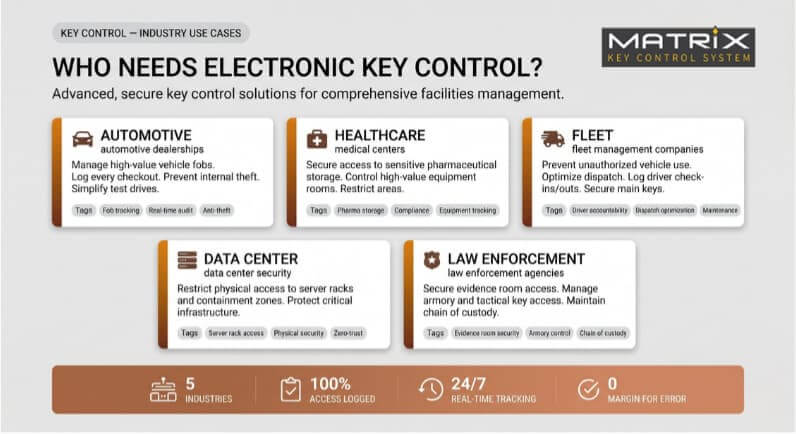
Automotive Dealerships and Fleet Operations
Vehicle keys move frequently between sales teams, service departments, drivers, technicians and managers. The system must allow fast retrieval while retaining clear accountability.
Important capabilities include high key capacity, rapid search, departmental permissions, overdue alerts and the ability to identify who currently holds each vehicle key.
Hotels and Hospitality
Hotels operate around the clock and may manage guest room master keys, maintenance keys, office keys and restricted-area credentials. Permissions often need to reflect employee roles, shifts and temporary access requirements.
The system should be simple enough for frequent daily use while providing strong control over master and emergency keys.
Property and Facility Management
Property managers may control keys for apartments, offices, plant rooms, storage areas and contractor access. Multi-site visibility and temporary permissions are particularly valuable in this sector.
The ability to determine which contractor or employee accessed a property can improve both accountability and service coordination.
Healthcare Organizations
Hospitals and healthcare facilities require reliable access to clinical, pharmaceutical, technical and administrative areas. A delay in accessing the correct key can interrupt essential work, while uncontrolled access can create serious security risks.
The system should support role-based permissions, around-the-clock availability and detailed audit records.
Government and Critical Infrastructure
These environments often require strict data control, strong physical separation, on-premise deployment and clearly documented emergency procedures.
Individual key isolation can be particularly important where different keys provide access to highly restricted zones or critical equipment.
Universities and Large Campuses
Campuses may contain hundreds of buildings and thousands of authorized users, including permanent staff, students, contractors, security teams and maintenance employees.
A scalable multi-site system can help maintain consistent policies while allowing local teams to manage daily access.
Common Mistakes When Selecting a Vendor
One of the most common mistakes is choosing a cabinet based only on the number of available key positions. Capacity is important, but it does not determine whether the system provides adequate security, useful reports or suitable access rules.
Other frequent mistakes include:
-
Assuming that a locked outer cabinet protects every key equally
-
Choosing the lowest initial price without reviewing recurring fees
-
Ignoring future expansion
-
Using shared credentials
-
Failing to define overdue key procedures
-
Overlooking power and network failure scenarios
-
Purchasing software that cannot integrate with existing systems
-
Failing to involve IT, security and operational teams
-
Selecting a vendor without appropriate local or remote support
-
Accepting a generic demonstration instead of testing real workflows
These problems can be reduced by preparing a written requirements document before requesting proposals. The document should describe the key inventory, user groups, locations, risk levels, integration needs and expected growth.
How to Evaluate a Vendor Demonstration
A polished sales presentation does not always show how the system will perform during daily operations. The buyer should ask the vendor to demonstrate realistic situations using the proposed hardware and software.
The demonstration should include:
-
Enrolling a new user.
-
Assigning access to selected keys.
-
Restricting access by time or department.
-
Removing and returning a key.
-
Attempting to access an unauthorized key.
-
Identifying an overdue key.
-
Generating a transaction report.
-
Disabling a lost credential.
-
Responding to a network or power interruption.
-
Adding capacity or connecting another cabinet.
The organization should pay attention to the number of steps required for common tasks. A feature-rich system may still create operational problems if routine administration is unnecessarily complicated.
Choosing Between Key Management System Vendors
There is no single system that is automatically suitable for every organization. The right provider is the one whose security architecture, software, support model and commercial structure match the buyer’s real operating requirements.
A small business may prioritize ease of use and a compact standalone installation. A large enterprise may need centralized multi-site management and extensive integrations. A sensitive government facility may prioritize on-premise operation and individual key isolation.
The selection process should therefore begin with internal requirements rather than vendor brochures. Organizations should map their keys, users, locations, risks and existing workflows before comparing products.
The most important questions are not “How many keys can the cabinet hold?” or “How much does it cost?” The more useful questions are:
-
Who should be able to access each key?
-
What should happen when a key is overdue?
-
Can one authorized user reach another user’s keys?
-
Can the system operate during an outage?
-
Can management retrieve reliable records immediately?
-
Will the system still meet operational needs several years from now?
When these questions are answered clearly, the differences between key management system vendors become much easier to evaluate.

Why Individual Key Isolation Matters
A system may use advanced authentication and still expose unnecessary keys after the user logs in. This is why organizations should evaluate the physical design inside the cabinet, not only the login screen.
Individual key isolation means that authorization releases only the approved key or compartment. Other keys remain physically unavailable. This supports the principle of least privilege, according to which users receive access only to the resources required for their work.
This architecture can reduce unauthorized handling, prevent opportunistic access and create a clearer connection between the electronic permission and the physical key released by the system.
It is especially relevant for master keys, emergency keys, vehicle inventories, high-security facilities and environments in which different departments share one central key storage location.
Matrix Key Control: A Scalable Approach to Physical Key Management
Matrix Key Control provides electronic key management systems designed to improve security, accountability and operational efficiency. Its systems combine controlled authentication, configurable permissions, automatic audit trails and scalable cabinet options.
A central characteristic of the Matrix approach is the ability to protect each key inside an individually locked compartment. After a user identifies themselves, the system can release only the compartment associated with the authorized key. Other compartments remain locked.
Depending on the selected configuration, Matrix solutions can support capabilities such as:
-
PIN, card or biometric user identification
-
Individual and group-based permissions
-
Automated transaction records
-
Reports by key, user and date
-
Monitoring of removed and overdue keys
-
Different cabinet capacities
-
On-premise system management
-
Expansion for growing key inventories
This approach is particularly relevant for organizations that do not want authentication at the cabinet door to provide physical exposure to the wider key inventory.
Matrix Key Control offers solutions for environments including automotive operations, hospitality, property management, healthcare, education, corporate facilities and other organizations where physical keys provide access to valuable assets or restricted areas.
Frequently Asked Questions About Key Management System Vendors
What do key management system vendors provide?
They provide electronic hardware and management software used to store, authorize, track and report the use of physical keys. A complete solution may also include installation, system configuration, integrations, user training and technical support.
How should an organization compare key management system vendors?
The comparison should cover physical key security, authentication, permission controls, audit trails, alerts, software deployment, scalability, integrations, reliability, support and total cost of ownership. Buyers should evaluate complete workflows instead of comparing cabinet capacity alone.
What is the difference between a key cabinet and a key management system?
A basic cabinet stores keys behind a locked door. A key management system identifies users, controls which keys they can access and automatically records removals and returns. More advanced systems also provide alerts, reports and integration with other platforms.
Should every key be individually secured?
Individual security provides greater control because authorization for one key does not automatically expose other keys. This can be important when several departments share a cabinet or when the inventory includes master keys, vehicle keys and high-security credentials.
Can an electronic key management system operate offline?
Some systems can continue authorizing users and recording transactions locally during a network interruption. Capabilities vary between vendors, so organizations should confirm exactly which functions remain available and how data is synchronized after connectivity returns.
Can key management systems integrate with access control software?
Many enterprise systems can integrate with access control, identity, HR, fleet or security management platforms. Buyers should confirm whether the required integration already exists, whether custom development is required and which system controls the user data.
How much does an electronic key management system cost?
The cost depends on cabinet capacity, authentication methods, software, installation, integrations and support. Organizations should compare total cost of ownership, including subscriptions, licenses, maintenance and expansion, rather than focusing only on the initial hardware price.
Can one system manage several locations?
Enterprise and multi-site systems can usually connect multiple cabinets and locations through centralized management software. The organization should verify how local administration, global permissions, reporting and connectivity are handled.
What happens when a key is not returned?
A properly configured system records the key as outstanding and identifies the responsible user. Depending on the vendor and configuration, it may also display an alert, send a notification, escalate the event or restrict further access.
What information should appear in the audit trail?
The audit trail should identify the user, key, cabinet, transaction type, date and time. It should also document failed access attempts, overdue events and important administrative changes.
Build a More Secure and Accountable Key Control Process
Comparing key management system vendors is not simply a hardware purchasing decision. It is an opportunity to establish a more secure, efficient and accountable process for controlling access to vehicles, facilities, equipment and restricted areas.
The right system should make authorized access faster while making unauthorized access more difficult. It should replace assumptions with reliable records, reduce dependence on manual administration and provide a structure that can grow with the organization.
Matrix Key Control provides scalable electronic key management solutions with configurable user permissions, comprehensive audit trails and individually locked key compartments. Contact Matrix Key Control to discuss your key inventory, security requirements and operational workflows, and identify the system configuration that best fits your organization.